When i click on the e-Filing official website https://ef.hasil.org.my, i have been informed to get the first time login pin number at the nearest LHDN office.
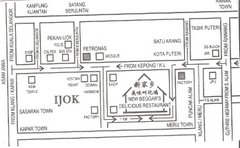
When i attend myself at the LHDN office (the one that is just opposite the Perhentian Bus Duta), there is a special department which handle e-Filing services application at the 1st floor. The procedure is quite easy, i just need to give my IC number to the LHDN officer, then they will register me on the system and give the pin number on the spot. It takes less then a minute for me to get my pin. (wow, i'm really impressed)
The LHDN officer even kind enough to offer me to do the e-Filing on the spot. I just when inside the room and have a look on how other people do that. Hmm, this is exactly why i don't wanna do that on the spot. I feel like no privacy where there are strangers standing behind, "reading" my annual income details... However, the officer did warn me that there are people trying to do the e-Filing at home, but they are not successfull. (Erm, i thought the idea of e-Filing is to ease the tax payer so that they need not attend themselves at the LHDN office to pay their tax?)
 When i finally gathered all the information i need, i went home to try on the e-Filing system by myself. After i downloaded and installed the Digital Certificate as required. I tried to login for the first time, but i'm not successful. I keep getting the same error (dcSignX Run-time error '5': Invalid procedure call or argument) after i keyed in my "CrytoAPI Private Key" password.
I'm kinda disappointed and regret that i didn't listen to the LHDN officer advise to do my e-Filing when i'm at the LHDN office :(
As LHDN office is actually quite far from the place i stay, i decided to give the customer service a call and see whether i can get help to solve the problem. Well, i don't really put in much hope. However, i get my surprise of the day, when my problem resolved with the help from the customer service officer.
goto
start -> setting -> control panel -> Regional and Language Option -> Advance
Make sure that, the option under "Select a language to match the language version of the non-Unicode programs you want to use" is selected as English (United States), the click Apply.

After that, my problem resolved, i can login successfully and do my e-Filing online. I really appreciate the help and also the e-Filing system. At least, from now i need not to apply a half day leave to settle my income tax. It is something that you really should try, if you do have internet access at home.
The information on the steps to do the e-Filing can be found at
https://ef.hasil.org.my/files/panduan.asp
https://ef.hasil.org.my/files/faq.asp